A thoughtful gaming gift can improve a familiar setup or make room for a new way to play. This collection includes audio gear, controls, and equipment for a more immersive screen experience.
Consider how the recipient plays and what their setup can support. The nine ideas below span personal accessories and larger upgrades for a gaming space.
9 Gift Ideas for Gamers
SteelSeries Arctis Nova 7P Wireless Gaming Headset

- Its wireless connection supports PC, PlayStation, Switch, or tablet play.
- The retractable microphone can be hidden for a commute.
- USB-C fast charging provides six hours of play after a 15-minute charge.
Best Gift For: A gamer who plays across consoles and PC and wants a headset that can also handle calls or music.

SHOKZ OpenFit Open-Ear Earhook Bluetooth Earbuds

- The open-ear design lets the wearer hear audio and their surroundings at the same time.
- The flexible ear hook is designed for a soft, secure grip.
- The charging case provides up to 28 hours of listening.
Best Gift For: A gamer who listens to audio while commuting or working out and wants to remain aware of their surroundings.
SteelSeries Apex Pro TKL Gaming Keyboard

- Per-key actuation has 40 levels of adjustment.
- A single key can be programmed for two different actions.
- The tenkeyless keyboard has a detachable USB-C connection.
Best Gift For: A PC gamer who likes tailoring key response and assigning more than one action to a key.
SteelSeries Rival 5 Gaming Mouse

- The layout has nine programmable buttons, including five quick-action side buttons.
- Its TrueMove Air optical sensor provides one-to-one tracking.
- The mouse weighs 85 grams.
Best Gift For: A PC gamer who plays fast-paced genres and wants programmable controls close at hand.
FIFINE AmpliGame AM8 USB/XLR Gaming Microphone

- It connects over USB or XLR, with USB intended for PC and XLR for a mixer sound card.
- The microphone includes a tap-to-mute control and gain knob.
- RGB lighting can be changed with a button when using USB.
Best Gift For: A gamer interested in streaming, podcasting, voiceovers, or recording video.
TP-Link Archer AXE75 WiFi 6E Router

- The router has a 6 GHz band for added bandwidth and responsive gaming.
- True Tri-Band and OFDMA technology increase capacity by 4 times to enable simultaneous transmission to more devices.
- OneMesh support allows connection to a TP-Link OneMesh Extender for whole-home coverage.
Best Gift For: Gamers sharing a home network
HUANUO FlowLift Dual Monitor Stand

- The stand accommodates compatible screens from 13 to 32 inches.
- Its full-motion arms tilt, swivel, and rotate for adjustable viewing.
- Built-in cable management guides wires along the arms.
Best Gift For: A gamer with two compatible monitors and a desk that suits a clamp or grommet mount.
Audioengine A2+ Wireless Computer Speakers

- The compact powered speakers are made for nearfield listening at a desk.
- They can stream wirelessly from phones, tablets, and computers.
- The speakers also have USB-C, RCA, and 3.5mm AUX inputs.
Best Gift For: A gamer who enjoys game audio through desktop speakers and also listens to music or podcasts.
Valerion VisionMaster Pro2 Triple Laser Projector
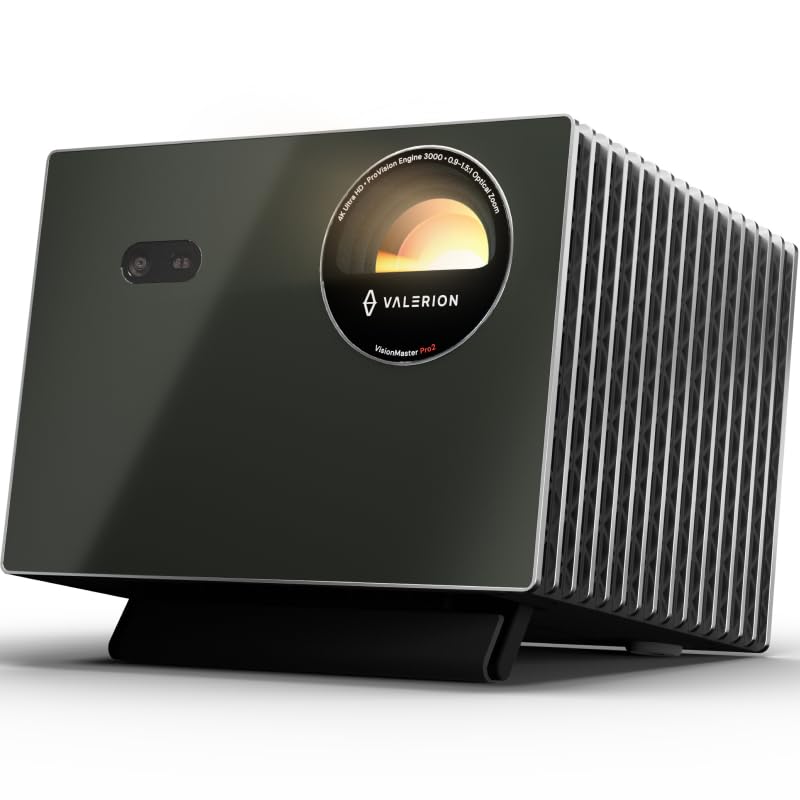
- The projector offers 4K UHD clarity with AI Super Resolution.
- It supports a 240Hz refresh rate on ultra-wide 21:9 or 32:9 screens.
- Gaming modes include RPG, FPS, and RCG.
Best Gift For: A gamer looking to build a large-screen entertainment space for games and movies.
Choosing gifts for gamers around their setup
Start with the way the person actually plays. A console regular may value a comfortable headset, while a PC player who fine-tunes controls could get more use from a keyboard or mouse.
Think about what they reach for every session and what feels like an unfinished part of their routine.
Room and equipment matter as much as gaming style. Before choosing a desk mount, find out whether the recipient has two screens and a desk that can support the mounting method.
For a larger entertainment upgrade, consider available wall space, viewing distance, and whether the room can be darkened.
If you are unsure about compatibility, ask discreetly for the console, computer, or setup details. A practical question to someone who shares the space can help you choose gifts for gamers that fit without spoiling the surprise.
Balance the budget with how often it will be used
Gaming gifts range from small additions to major room upgrades, so set a comfortable budget before comparing options. A microphone or mouse can be a focused change to a daily setup; a projector is a much larger commitment that may suit a household sharing the gift.
Think about the supporting purchases, too. A desk accessory needs a compatible desk and screen arrangement, while a new audio device may only make sense if it connects to the recipient’s existing gear.
Check current prices and confirm what is included before making a decision.
When several people are contributing, pooling funds can make a larger upgrade feel manageable. Otherwise, choose an accessory that fits the budget and the person’s established habits instead of stretching for equipment they may not have room or use for.
Personalize gifts for gamers with the way they play
Personal touches work best when they reflect a real interest. For someone who streams, pair a microphone with a note about the games or sessions they love sharing.
For a player who enjoys a tidy desk, frame an accessory as a way to make their favorite corner more comfortable.
For gifts for gamers, presentation can make a practical item feel especially considered. Wrap it with a handwritten message naming a memorable game night, or add a small snack for their next session.
If the item is meant for a shared room, acknowledge the people who will enjoy it together.
Avoid assuming every player wants the same aesthetic or features. A quick look at their setup or a conversation with a close friend can reveal whether they prefer headphones, speakers, wireless accessories, or a simple upgrade to an existing arrangement.
Make the gift feel complete
Check what is included and whether the gift needs anything else to work in the recipient’s setup. Confirm connection types and compatibility for computers, consoles, displays, and network equipment.
For a monitor mount, verify the screens and desk carefully; dimensions and mounting details affect whether it will be useful.
Consider how the item will fit into the room. Audio equipment and a projector may affect other people in a shared space, while a desk accessory needs room to install and use.
A brief, thoughtful conversation can help avoid giving someone a bulky item without a place for it.
If the main gift is more specialized, a small complementary item can make the presentation warmer without adding clutter. A personal card, a favorite drink, or an invitation to play together can connect the gift to the recipient’s interests.
Last-minute buying advice
For a close deadline, favor a gift whose compatibility you can confirm quickly. Check the exact model, connection needs, dimensions, and what comes in the package.
Read the current delivery estimate at checkout rather than assuming an item will arrive by a particular date.
A digital gift card to a retailer the recipient already uses can be a flexible fallback when a specific device or setup detail is uncertain. You can still make it personal with a note suggesting a game night or letting them choose an accessory they have been considering.
Keep the wrapping simple if timing is tight: a card with a specific message can do more than elaborate packaging. If an item arrives later, explain the plan clearly and make the occasion feel intentional.
That gives the recipient something thoughtful to look forward to.