This Donner Starrypad MIDI controller review looks at a pad-focused controller for producers who want hands-on drum, sample, and effect triggers. Its appeal centers on assignable pads and extra controls, with a DAW required to hear the results.
Donner STARRYPAD Review Summary
The quick verdict
400+ ratings
Read Amazon ReviewsDonner STARRYPAD
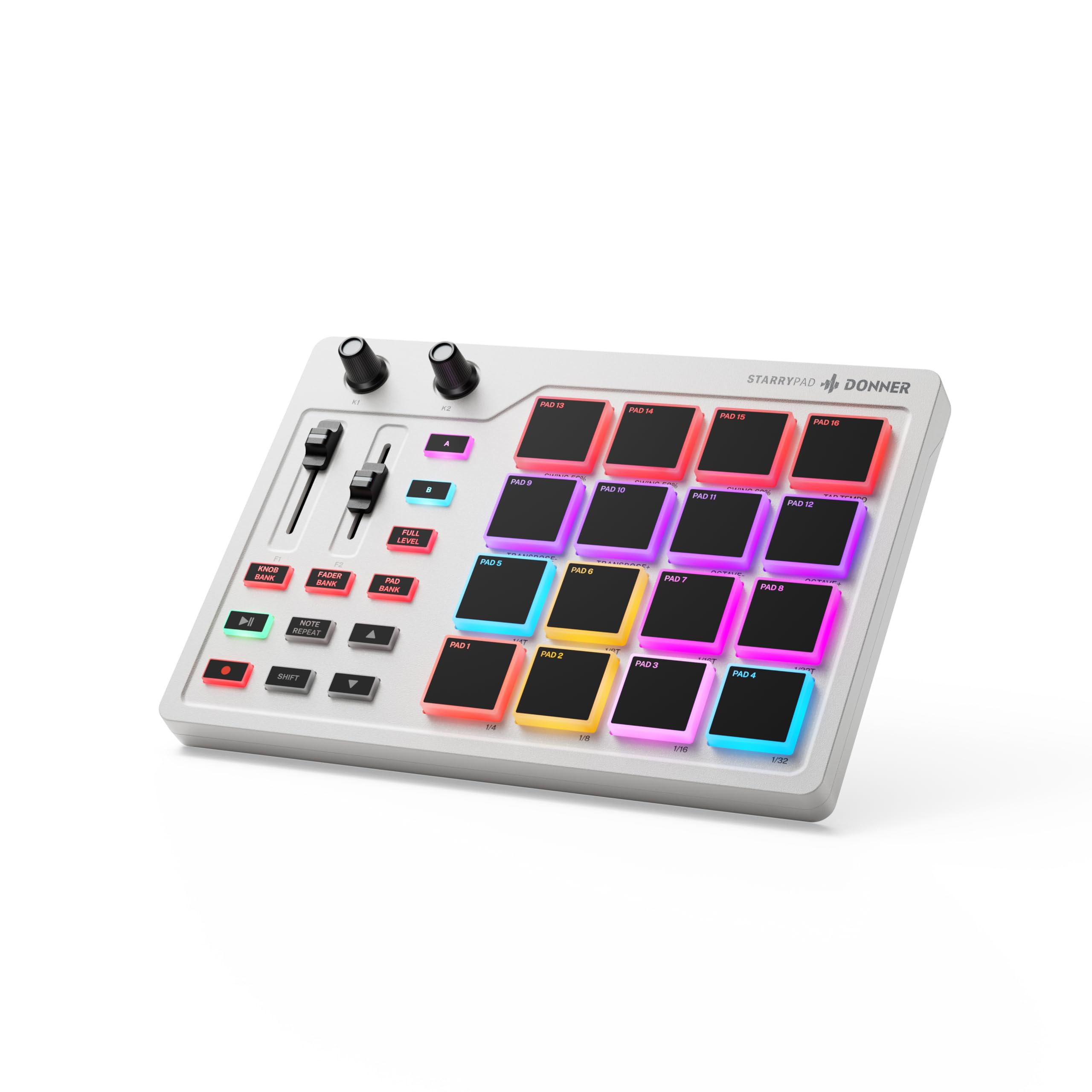
A pad-focused MIDI controller for producers who want customizable drum and sample triggers, plus hands-on DAW controls.
- Sixteen soft silicone backlit pads trigger drums, samples, effects, and other assignable sounds.
- Three switchable pad banks provide 48 assignable pads, with adjustable velocity sensitivity curves.
- Two faders, two knobs, three buttons, and a Shift key add customizable control options.
- Backlit pads support seven colors for visually grouping instruments.

Pros
- Switch among three pad banks to access up to 48 assignable pads.
- Extra faders, knobs, buttons, and Shift-layer control offer more than pad triggering alone.
Consider before buying
- It does not produce sound by itself, so plan on using DAW software in the setup.
- Connecting an iPhone or iPad requires a separately purchased Apple Lightning to USB adapter.
Read the full review summary
The STARRYPAD suits beat makers who prefer tapping pads to entering parts on a keyboard. Sixteen backlit pads can trigger drums, samples, and effects, and switching among three banks gives access to 48 assignable pads.
Adjustable velocity curves add a way to tailor pad response to a workflow.
It is a better fit for someone building beats inside a DAW than for anyone seeking a standalone drum machine.
The controller needs DAW software to produce sound, while its USB-C connection and MIDI in/out offer routes into a computer-based setup or external MIDI equipment.
The buying factors
Donner STARRYPAD Scorecard
Editorial scores reflect listed features and buyer fit; they are not laboratory measurements or customer ratings.
Pad control
Sixteen backlit pads, three banks, and velocity sensitivity curves provide flexible ways to map and play drum and sample parts.
Hands-on DAW controls
Two faders, two knobs, and three buttons expand control beyond the pads, with another layer available through the Shift key.
Workflow feedback
Seven lighting colors help visually group instruments, and Tap Tempo synchronizes with a DAW for setting a song's BPM.
Connection flexibility
USB-C supports power and data, while included MIDI in/out cabling can connect the controller to external synthesizers or vintage MIDI equipment.
Setup versatility
Compatibility covers Android, iOS, Mac, and Windows, although iPhone or iPad use requires a separately purchased Apple Lightning to USB adapter.
Standalone use
This is a controller rather than a self-contained sound source; it needs DAW software to make sound.
Key Features and Specifications of Donner STARRYPAD
- Sixteen soft silicone backlit pads trigger drums, samples, effects, and other assignable sounds.
- Three switchable pad banks provide 48 assignable pads, with adjustable velocity sensitivity curves.
- Two faders, two knobs, three buttons, and a Shift key add customizable control options.
- Backlit pads support seven colors for visually grouping instruments.
- Tap Tempo synchronizes with a DAW; Note Repeat is included for repeating sample segments.
- USB-C handles power and data, and included MIDI in/out cabling supports connections to external MIDI equipment.
- Compatible with Android, iOS, Mac, and Windows; the controller needs DAW software to produce sound.
Pros and Cons of Donner STARRYPAD
Pros
- Switch among three pad banks to access up to 48 assignable pads.
- Extra faders, knobs, buttons, and Shift-layer control offer more than pad triggering alone.
- Color lighting can help organize instruments visually.
- USB-C and MIDI in/out give it several ways to fit a production setup.
Consider before buying
- It does not produce sound by itself, so plan on using DAW software in the setup.
- Connecting an iPhone or iPad requires a separately purchased Apple Lightning to USB adapter.
- The editor is for setting pad colors; it does not record or arrange music, so those tasks belong in a DAW.
Who Should Buy Donner STARRYPAD?
Good fit
Choose the STARRYPAD if your beat-making workflow revolves around triggering drums, samples, and effects from a compact pad surface. Its three banks, velocity curves, lighting, and additional controls provide room to map varied parts and hands-on DAW functions.
It also makes sense for producers who want one controller to work across desktop and mobile platforms or to send MIDI to external equipment.
Check the connection you need: iPhone and iPad use requires an Apple Lightning to USB adapter, while sound generation still depends on DAW software.
Who should skip it
Skip it if you need a standalone drum machine that makes sound without a connected DAW. The STARRYPAD is designed to send control input, so it belongs in a software-based production setup.
It is also a poor fit if you mainly want to play notes from a keyboard. Its central interface is a set of assignable pads and controls rather than keys.
Donner STARRYPAD Review Analysis
Pad layout and beat-making workflow
The 16-pad surface is the heart of this controller. Three banks raise the available assignments to 48, making it possible to organize separate groups of drums, samples, or effects.
Adjustable velocity curves give producers another way to tune how pad input behaves in their chosen software.
Controls beyond the pads
Two faders, two knobs, and three buttons broaden its role from triggering clips or hits to adjusting mapped parameters.
The Shift key adds another customized control layer, which can help users make a compact surface serve more than one part of a DAW workflow.
DAW and connection requirements
The controller needs DAW software to make sound, and its editor handles pad-light settings rather than recording or arranging. USB-C supplies power and data, while MIDI in/out can connect external synthesizers or vintage MIDI equipment.
For iPhone or iPad use, budget for an Apple Lightning to USB adapter.
Alternatives to Donner STARRYPAD
Computer Recording MIDI Controllers alternative
300+ ratings
Read Amazon ReviewsDonner DMK25 Pro MIDI Keyboard Controller
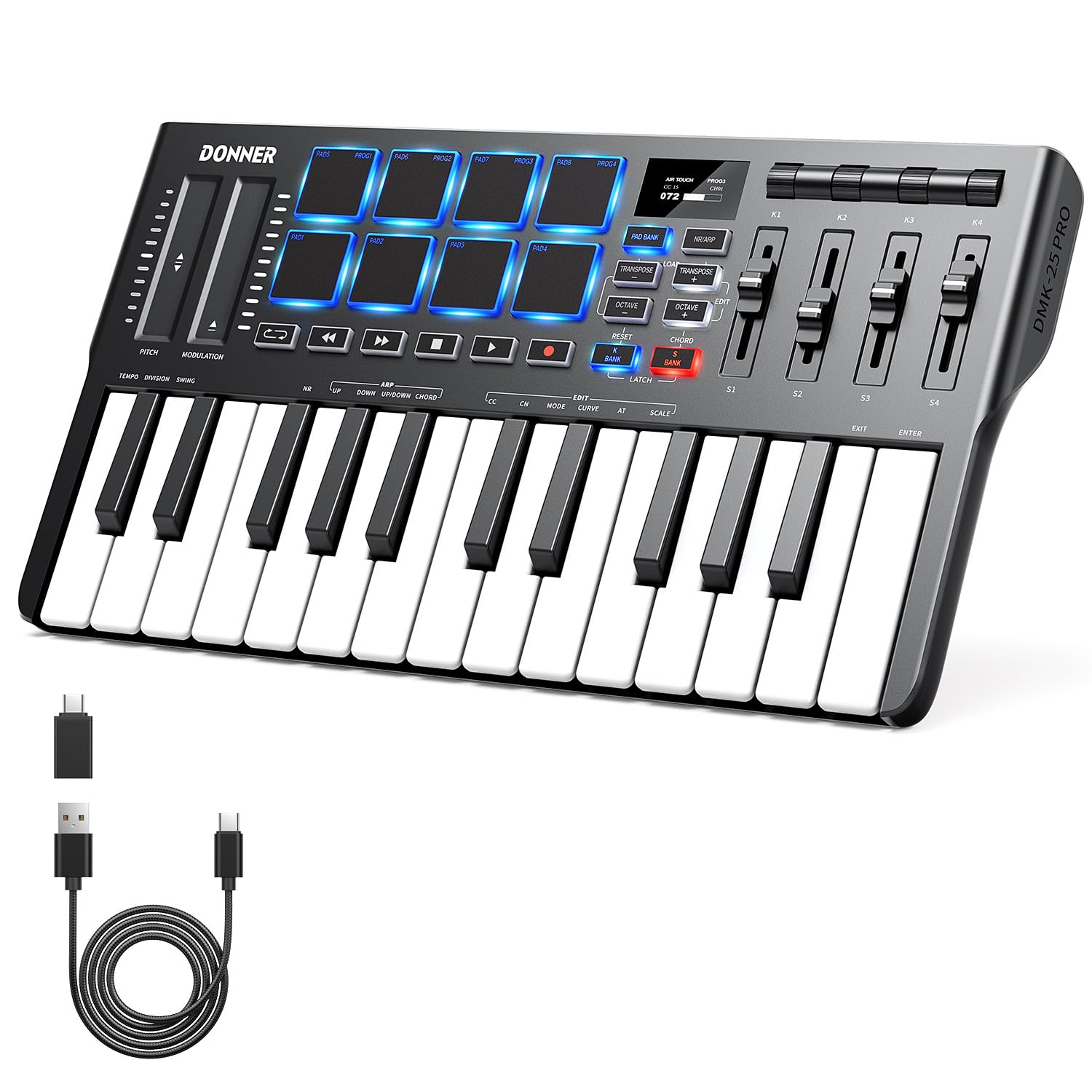
Choose the STARRYPAD for a pad-first setup focused on triggering drums and samples; choose the DMK25 Pro if you want mini keys alongside drum pads and keyboard-based composition functions. Both require DAW software for sound.
- The DMK25 Pro combines mini keys with eight velocity-sensitive drum pads and offers scale, arpeggio, note-repeat, and chord functions. It also needs DAW software to make sound.
- The STARRYPAD centers on assignable pads for drums, samples, and effects, and it also needs DAW software to produce sound.
Computer Recording MIDI Controllers alternative
400+ ratings
Read Amazon ReviewsDonner N-32 MIDI Keyboard
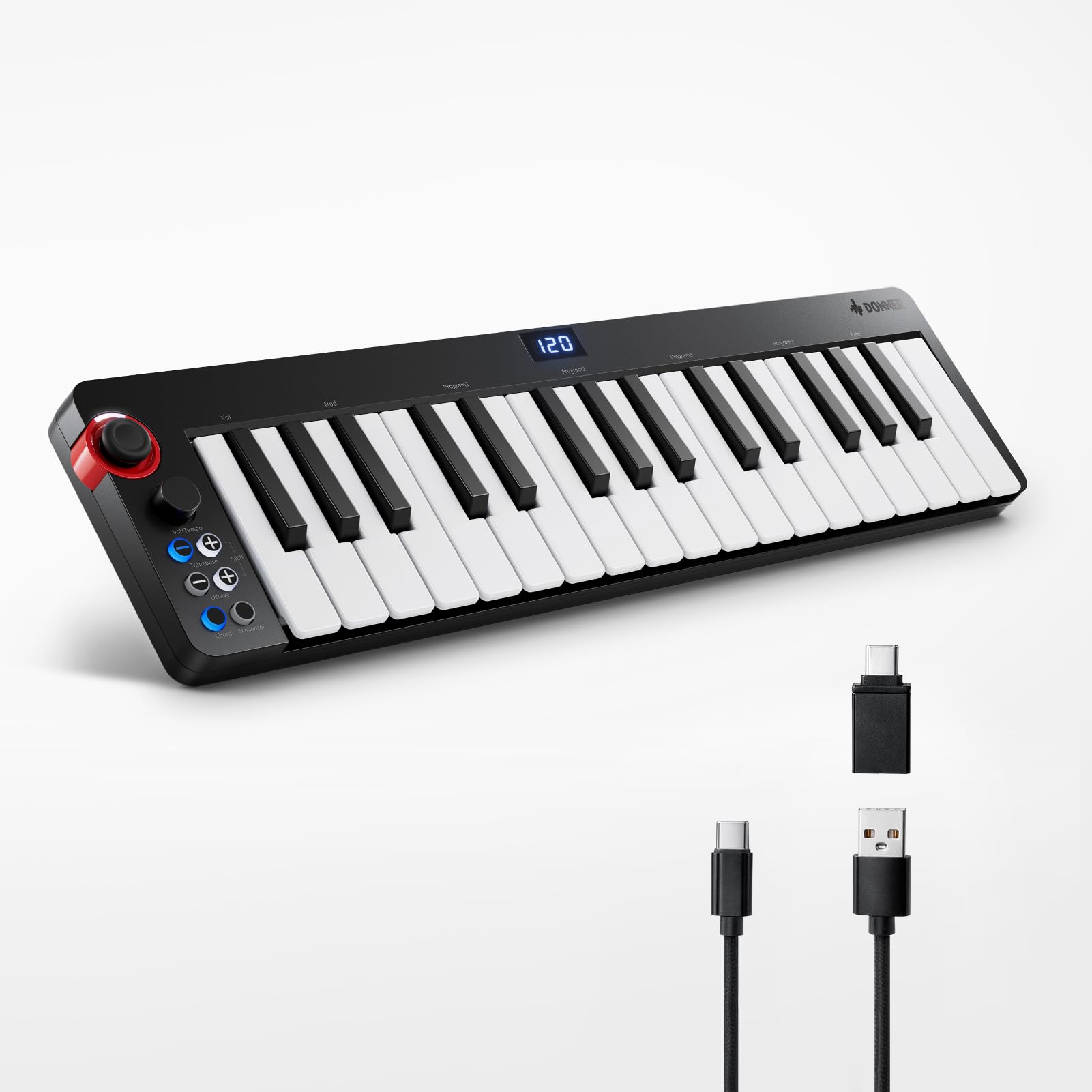
Choose the STARRYPAD when assignable drum and sample triggers are central to your workflow; choose the N-32 for keyboard-based composition with velocity-sensitive keys and sequencing functions. Both depend on DAW software to make sound.
- The N-32 is built around velocity-sensitive keys and adds a sequencer, chord arpeggiator, octave, and pitch-shifter functions. It also needs DAW software to produce sound.
- The STARRYPAD offers assignable pads for drum, sample, and effect triggering, with faders and knobs for added control.
Is Donner STARRYPAD Worth It?
The Donner STARRYPAD is worth considering if your production workflow centers on tapping in drums, samples, and effects and you want extra controls for mapped DAW functions.
Its 48 assignable pad positions, velocity curves, lighting, and MIDI connectivity make it a flexible controller for that role.
Pass on it if you expect a self-contained instrument: it does not sound alone and relies on DAW software, while the pad-light editor does not handle recording or arranging.
With those workflow limits in mind, it is a focused choice for beat makers who want assignable pads and hands-on control in a software-based setup.
Your review at a glance
400+ ratings
Read Amazon ReviewsDonner STARRYPAD
A pad-focused MIDI controller for producers who want customizable drum and sample triggers, plus hands-on DAW controls.
- Sixteen soft silicone backlit pads trigger drums, samples, effects, and other assignable sounds.
- Three switchable pad banks provide 48 assignable pads, with adjustable velocity sensitivity curves.
- Two faders, two knobs, three buttons, and a Shift key add customizable control options.
- Backlit pads support seven colors for visually grouping instruments.